Keep Your OT Stack: How DMI and AnyLog Work With Existing Data Acquisition Middleware and SCADA
By Mark Davidson, CEO
Walk into almost any plant and you'll find a layer of software between the PLCs and the business systems: a SCADA platform like Ignition or Wonderware, a connectivity server like Kepware, an edge platform like Litmus, and one or more historians. These systems took years to configure and they run the plant every day. The last thing an operations team wants is a new platform that asks them to rip any of it out.
DMI and AnyLog are designed for exactly that environment. They connect to what you already have, leave it in charge of what it does well, and add the analysis those systems weren't built to do.
Three layers, each doing its own job
- Your OT stack. PLCs, SCADA and HMI, connectivity servers, edge platforms, historians and SQL databases. It keeps collecting data, running screens and alarms, and controlling the process.
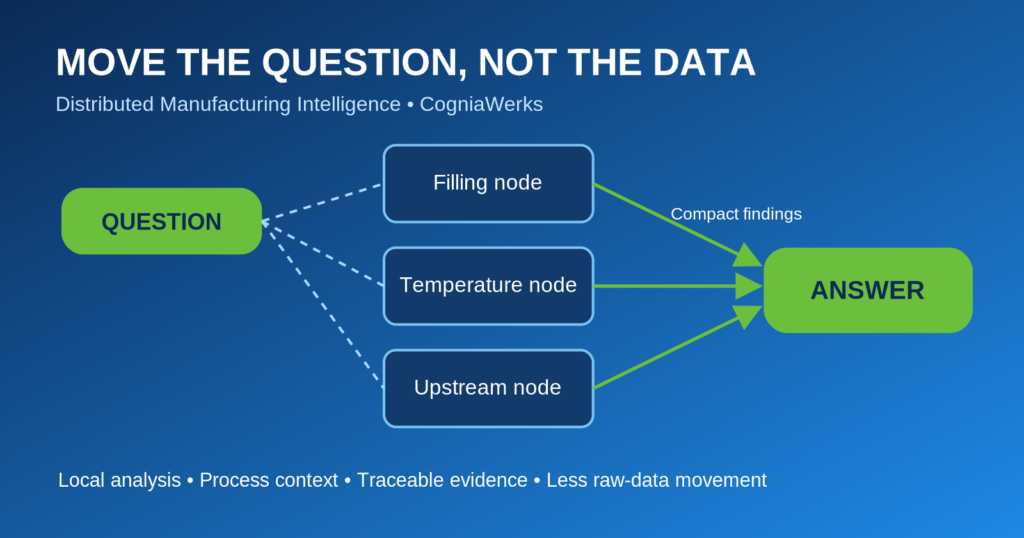
- AnyLog edge data fabric. Lightweight AnyLog nodes run next to your existing systems, inside the plant firewall. They connect to them through standard interfaces, keep the data local, and publish the metadata that describes it. Together the nodes present every source, across lines and sites, as one queryable system.
- DMI. DMI runs on top of AnyLog. It builds the unified namespace and process graph, runs statistical process control, OEE and root-cause analysis, answers questions in plain language, and turns findings into approved actions.
Your systems stay the systems of record. AnyLog connects them. DMI explains what's happening and what to do next.
The interfaces that make it work
Integration doesn't depend on custom plug-ins for each vendor. It uses the open interfaces that OT platforms already expose:
- OPC UA for live tag values from SCADA, connectivity servers and many PLCs.
- MQTT for platforms that publish tag changes to a broker.
- SQL databases for historians and platforms that store history in SQL Server, MySQL or PostgreSQL.
- REST APIs for platforms and historians with web interfaces.
- Industrial protocols such as Modbus and DNP3 where a device has no middleware in front of it.
If it speaks MQTT, OPC UA or SQL, it works with DMI
The platforms named in this article are examples, not a compatibility list. The same two paths work with virtually any SCADA system or middleware:
- Send live data in over MQTT or OPC UA. Any SCADA or middleware platform that can publish to an MQTT broker or serve tags over OPC UA can stream data to DMI through AnyLog. No custom connector is needed.
- Query history in place over SQL. Any SCADA system or historian that stores its data in a SQL database can be queried directly by DMI through AnyLog, so years of existing history are available without exporting or copying it.
If your system can publish over MQTT or OPC UA, or store its history in SQL, DMI can use its data.
Ignition
Inductive Automation's Ignition is often the hub of a modern plant: it connects to PLCs, runs HMI screens and alarming, and logs tag history to a SQL database. AnyLog can read live tags from Ignition's OPC UA server, subscribe to tag data that Ignition publishes over MQTT, or read the tag history Ignition stores in its SQL database. Ignition keeps running the screens, alarms and control logic your operators rely on. DMI adds what Ignition doesn't do on its own: separating real process changes from noise, tracing a problem upstream to its cause, and putting a value on fixing it.
Kepware
PTC's Kepware KEPServerEX is the protocol translator in many plants, with drivers for a wide range of PLCs and devices. It exposes everything it collects through its OPC UA server, and its IoT Gateway can publish data over MQTT or REST. AnyLog connects to either path, so Kepware stays responsible for talking to the equipment and nothing needs to be re-tagged. Any device Kepware can reach becomes available to DMI.
Litmus
Litmus Edge collects and normalizes data from industrial equipment at the edge. It can publish that data to an MQTT broker, expose it over OPC UA, and send it to databases. AnyLog picks it up from any of those outputs. Litmus continues to handle device connectivity and data normalization, while AnyLog adds distributed, cross-site querying and DMI adds process-aware analysis and root cause.
Wonderware and AVEVA
Many plants still run Wonderware InTouch and System Platform, now part of AVEVA, with years of history in an AVEVA (Wonderware) Historian. That historian is built on Microsoft SQL Server, so its history can be queried with SQL right where it lives, and live values are available over OPC UA. DMI can analyze years of existing history without exporting it to a data lake, and compare it with what's happening on the line right now.
Other SCADA platforms and historians
The same approach applies to other platforms, such as FactoryTalk, WinCC, AVEVA PI and many others, through the interfaces they support: OPC UA for live data, SQL or REST for history, and MQTT where data is already published to a broker.
At a glance
| Platform | It keeps doing | AnyLog connects through | DMI adds |
|---|---|---|---|
| Ignition | HMI, alarming, control logic, tag history | OPC UA, MQTT, SQL history | SPC, root cause, process graph |
| Kepware | Device drivers and protocol translation | OPC UA, MQTT or REST (IoT Gateway) | Analysis across every device it reaches |
| Litmus Edge | Edge collection and normalization | MQTT, OPC UA, database outputs | Cross-site querying, root cause |
| Wonderware / AVEVA | SCADA, HMI, historian | SQL (historian), OPC UA | Analysis of years of history in place |
| Other SCADA and historians | Supervision and history | OPC UA, SQL, REST, MQTT | A single view across vendors |
What doesn't change
- No rip and replace. Your SCADA, HMI, middleware and historians stay in place.
- No re-tagging. DMI maps existing tags into its unified namespace instead of asking you to rename them.
- No central copy. Data stays in the plant, and only metadata and query results move across the network.
- No changes to control. DMI reads data. When it recommends an action, a person approves it and it runs as a work order, a Microsoft Teams post or a Power Automate flow. DMI doesn't write setpoints to your control system.
Getting started
- Pick a line with a recurring problem and list the systems that hold its data.
- Deploy an AnyLog node on an existing server or edge device near those systems.
- Point it at what you have: an OPC UA endpoint, an MQTT topic, or a historian database.
- Let DMI discover the data, build the namespace and process graph, and start the analysis.
If you run Ignition, Kepware, Litmus, Wonderware or another platform and want to see DMI working with it, request a demo and tell us what's in your stack.
Ignition is a trademark of Inductive Automation. Kepware and KEPServerEX are trademarks of PTC. Litmus and Litmus Edge are trademarks of Litmus Automation. Wonderware, InTouch, System Platform and AVEVA are trademarks of AVEVA Group. Other names are trademarks of their respective owners. Mentioned for compatibility only; no endorsement or partnership is implied.
See DMI on your process
Book a tailored walkthrough with our team.